



Merle Randlepp
Agile Coach
Merle Randlepp
Agile Coach
IT Manager Metrics: Framework + Lead Time vs Cycle Time (1/3)

Introduction
There are many numbers in the IT world, but few show whether we are really creating business value. Sales revenue and other financial numbers are relatively easy to measure, but it is much more difficult to choose 3-5 metrics that actually help to manage the development of the IT team.
A well-chosen set of metrics gives the manager a comprehensive overview of the teams’ progress and allows them to make better management decisions. If metrics support the achievement of business goals and help track team efficiency, they can also be successfully incorporated into OKRs.
In this series of articles, we highlight five metrics that are popular in the IT world and that help you assess the speed of value creation, process efficiency, quality, durability of promises, and customer satisfaction:
- Lead Time – focus on speed
- Cycle Time – focus on speed and process efficiency
- Production Bug Rate – focus on quality
- Promise Fulfillment Rate (Planned vs Done Rate, Velocity, Throughput) – focus on planning and throughput
- Stakeholder NPS – focus on satisfaction
With each metric, I explain its nature, benefits to the manager, give examples of use, give instructions on how to get started, and list common implementation mistakes.
I will also briefly mention other well-known metrics such as WIP, DORA and service metrics.
A separate chapter provides an overview of indicators with a negative impact that seem good at first glance, but in fact are starting to promote gambling and negative anti-patterns.
Teams that have simple and accurate metrics to evaluate their work have an advantage and can track their development journey clearly and numerically. The right attitude of the leaders determines a lot here – team metrics are the triggers of the conversation and a natural part of the development engine, not an argument for using the “whip”.
It should be mentioned right away that there is no one-size-fits-all set of metrics. Teams with different personalities (product development, infra/ops, user support, platform, etc.) need different emphases. From the list of recommended metrics, you should select the ones that really fit your team’s workflow. An informed choice is important, but it is always good to experiment, and if the chosen metric does not help you make good decisions, you can try the next one.
Note: Since Jira is a very widely used project management software in the IT field (estimated usage share about 60%), the images and guides in this article are mainly based on Jira. Common project management tools are also Azure DevOps, Asana, Monday, Trello, Redmine, and many others.

5 metrics that are useful to analyze once a month
1. Lead Time
Let’s start with the most popular IT metric – Lead Time (also called Time-to-Value, Idea-to-Production). In Estonian, it is also said colloquially “time from idea to delivery”, but most often the English term is used.
Lead Time – what is it?
This is the time from the idea or inquiry to the moment when the result is available to the user or customer. By its very nature, it shows how quickly the value reaches the customer.
Team Lead Time is the median Lead Time for all work done on the team.
Why is it important for a manager?
- Reflects Promise Keeping and Market Speed
- Provides a common clock between business and IT (time-to-value)
- It is directly related to workflow: the shorter the Lead Time, the more often we see results
Examples
Customer service
The customer’s inquiry will be made on 1 March, the answer/solution will be available on 20 March.
Lead Time = 20 days.
Product development
The development request will be added to the Product Backlog on 1 March and delivered to production on 20 April.
Lead Time = 51 days.
It is often asked how Time-to-Value differs from another very popular term, Time-to-Market? In general, the term Time-to-Market is used in a longer time scale, encompassing the speed at which a product or a larger part of a product is brought to market. In Estonian, the equivalent “market launch speed” is common.
How to get started and measure?
It is important to agree on and fix the Lead Time start and end time rule precisely. The nature of the team’s work must definitely be taken into account. While in the case of user support, we assume that all questions sent by the customer will be answered, then in product development it is normal for all the work added to the product backlog not to move on to development – some are deliberately left undone and we do not want to measure their waiting time.
Steps to implement the Lead Time metric:
- Fix the start and end time rule: in product development, the start time is usually the “Created” status of the job and the end time is the “Released” status
- Measure time in calendar days
- Segment and differentiate between types of work (error, development request, etc.)
- Find a way to visually display metric values (including median values) by filtering the time period
- View the trend by month, e.g. the view of the last 3-6 months
- Add a metric to your team’s dashboard
In Jira, the “Control Chart” is suitable for monitoring the metric.
See also More: Guides in Jira
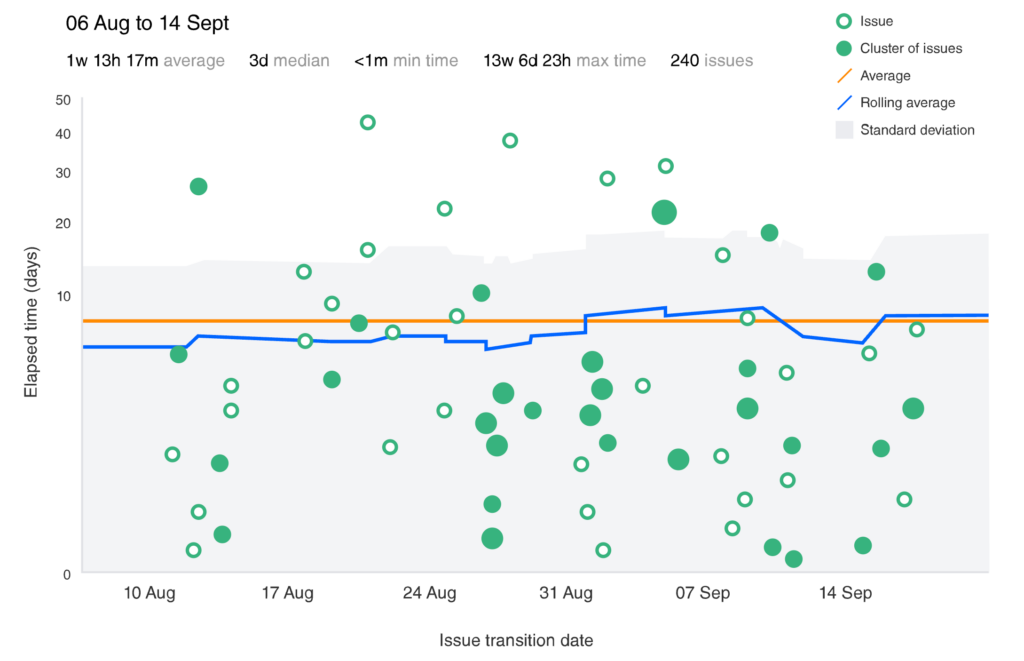
Figure 1. Jira Control Chart
Common mistakes
🚨 One of the common mistakes when using this metric is mismarking the end time – either too early or too late. For example, the developer moves the work to the “Done” status, but the work has not actually been delivered yet and has not reached the user. In this case, the Lead Time will be shorter than it actually is.
🚨 Or the other way around – the work is completely finished, but waiting to be put together. In this case, the Lead Time will be longer than it actually is.
🚨 Another risk is comparing apples and oranges, which happens if you skip the segmentation and mix all types of work into one pile. It is useful to decide which type of work Lead Time is important and treat it only as a metric. In product development, the measurable type of work is often a new development request, i.e. functionality/feature.

2. Cycle Time
When we talk about the Lead Time metric, there is no way we can fail to mention its counterpart – a metric called Cycle Time. In Estonian, the equivalents are “cycle time” or “processing time”.
Cycle Time – what is it?
This is the time from the moment when the work is actually undertaken until it is completed in the team’s view. Cycle time measures the actual processing time of the job in the team’s work process.
Cycle Time is a subset of the Lead Time metric and doesn’t include wait times before and after the job is done:
Lead Time = Wait Times Before + Cycle Time + Wait Times After.
Why is it important for a manager?
- Shows the real bottlenecks in the workflow
- Makes forecasting more realistic
Which One to Use – Lead Time vs Cycle Time?
- Choose Lead Time if the focus is on customer wait time, SLAs, business promises, time-to-value.
- Choose Cycle Time if the focus is on the team’s internal workflow and efficiency: bottlenecks, forecasting completion, etc.
Simple rule of thumb:
- Improve Lead Time if jobs “wait” too long in the Product Backlog or after completion.
- Improve the Cycle Time if jobs are delayed and they are in the “In Progress” status for too long.
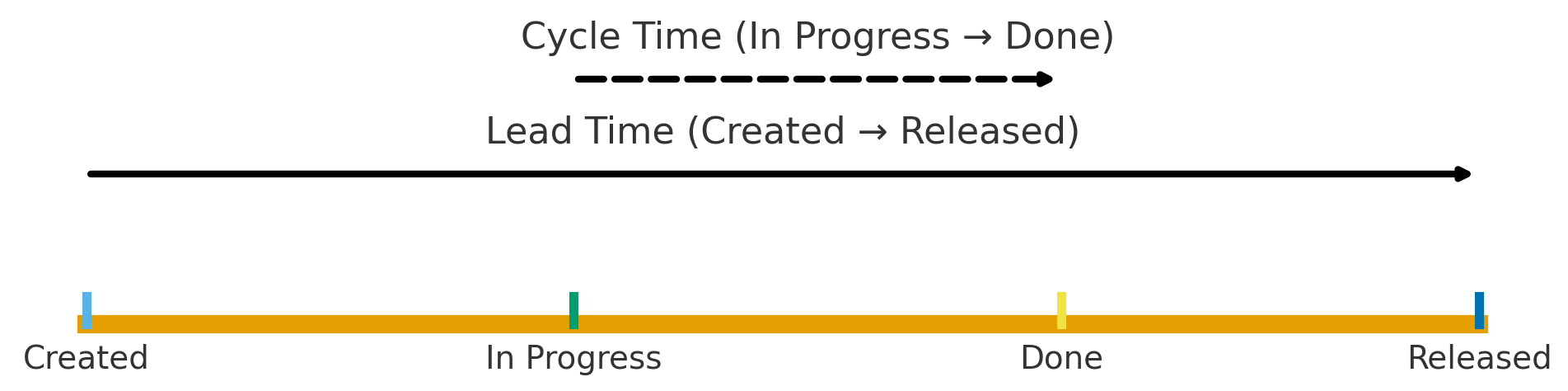
Figure 2. Comparison of Lead Time and Cycle Time
Examples
Customer service
Customer’s inquiry on 1 March, the solution will be available on 20 March.
Lead Time = 20 days.
The employee starts working with the inquiry on 5 March and ends on 20 March.
Cycle Time = 15 days.
Product development
The development request will be added to the Product Backlog on 1 March and delivered to production on 20 April.
Lead Time = 51 days.
The team will start work on March 25, finish the work and bring it to “Done” status on 10. April.
Cycle Time = 16 days.
How to get started and measure?
The process of implementing the Cycle Time metric is almost the same as for the Lead Time metric, only the start and end time are defined differently.
Steps to start using the Cycle Time meter:
- Fix the start and end time rule: in product development, the start time is usually the “In Progress” status of the job and the end time is the “Done” status
- Measure time in calendar days
- Segment and differentiate between types of work (error, development request, etc.)
- Find a way to visually display metric values (including median values) by filtering the time period
- View the trend by month, e.g. the view of the last 3-6 months
- Add a metric to your team’s dashboard
What is “Done”? The meaning of the “done” status here depends on the team’s agreement, it can be:
- fully completed waiting to be delivered to production or
- has been delivered to production, but is not yet visible to users (hidden behind feature flags), or
- is delivered to production and is visible to users (same as “Released”).
In Jira, the “Control Chart” is suitable for monitoring the metric.
See also More: Guides in Jira
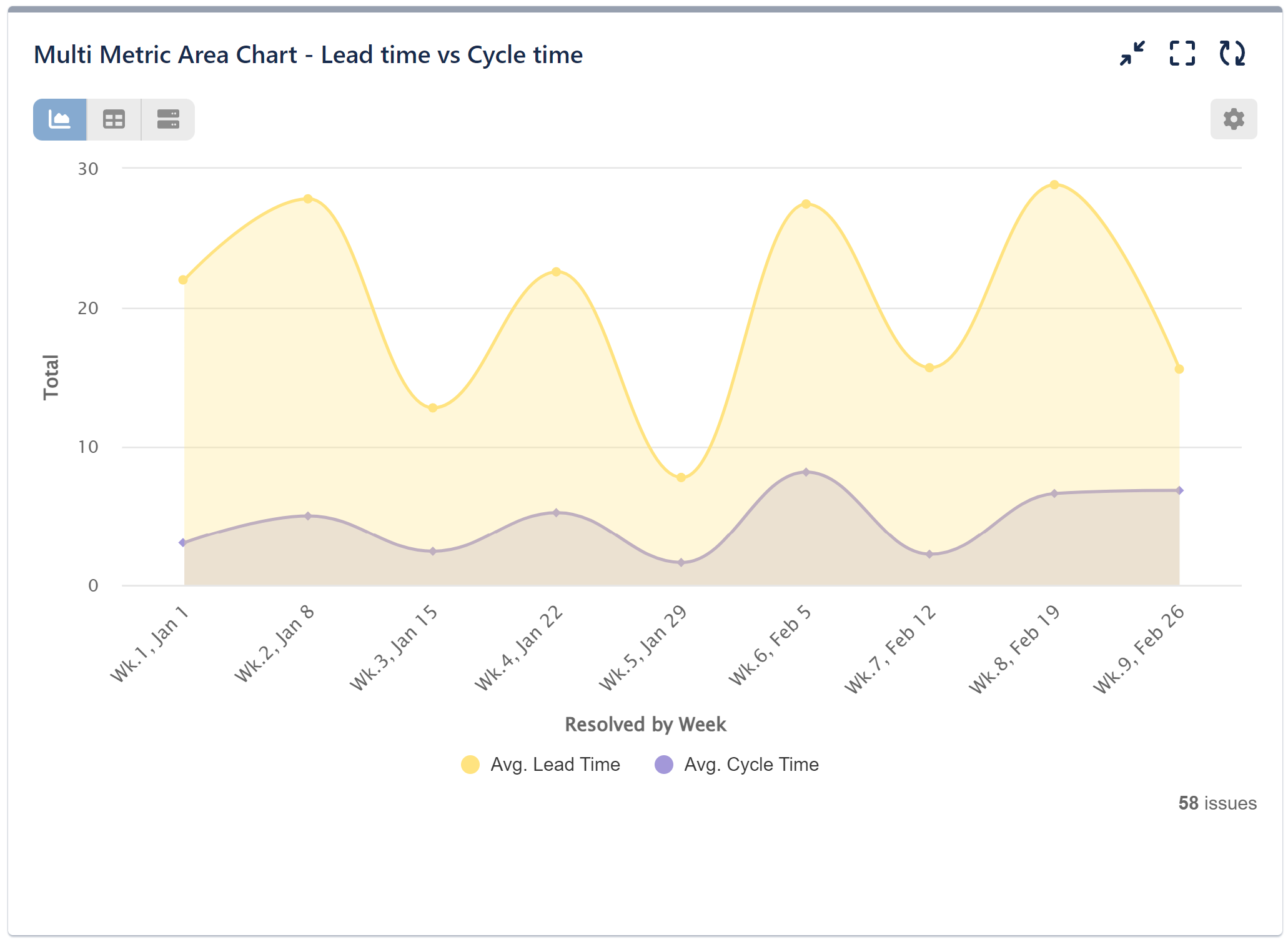
Figure 3. Lead Time and Cycle Time report (Jira plugin “Performance Objectives”)
Common mistakes
🚨 Common mistakes largely overlap with those described in the Lead Time chapter. The biggest confusion arises when the start and end moments of Lead and Cycle Time are not unambiguously agreed. Clearly agree on when the work will “start” (e.g. when the work is added to the sprint) and when it will be “Done”, and keep the “Done” and “Released” statuses separate.
🚨 Cross-team comparisons without context are misleading: it is not reasonable to compare teams with different workflows and status definitions – it is more reliable to follow trends within the team. If the definitions of status are uniform and the nature of the work is similar, the metrics are also well comparable between teams.
Appendix: Guides in Jira
- Configure columns
- View and understand the control chart
- Methods of calculating rolling average on the control chart
- Track cycle time with the Control Chart
- View and understand the cumulative flow diagram
- Create a custom report for your service project
- Configure custom dashboards
- Dashboard gadgets
- An effective dashboard for Service Desk and Customer Support teams in Jira Service Management
Lisa: Jira plugins
Next part
The next part of the metrics series is “Quality and Capability: Production Bug Rate + Planned vs Done/Velocity/Throughput (2/3)”
Related topics

What is the RICE model in product development?
In product development, we never have enough time or resources to implement all desired initiatives. Product owners constantly evaluate which developments to pursue and which to postpone, and making the right decisions is far from easy. The RICE model helps us make faster and more accurate decisions when prioritizing tasks.

The 8 Biggest Mistakes of a Product Owner
The role of the Product Owner is the most important role in a software development team. This role is far from easy, the area of responsibility is large and varied, the workload is usually as well, and so it may happen that “the seams start to burst” somewhere. I have compiled eight of the most common mistakes made by product owners that have the greatest impact in product development.
Agility posters
Posters are very useful tools for conveying the message and there is great power in visualisation. Before the corona time, I used them on the walls of meeting rooms, but now in the virtual Zoom era, I used them in the Miro environment. Here you will find some of my agile posters and some favorites from other authors. Everything is meant to be used freely!


Every new contact is an opportunity for new and exciting collaboration - write or call me, and let's discuss how I can help you.
The first consultation and proposal are always free.